
One monthly fee and guest lists you reuse all year. Save at least 20% vs one-time pricing.
As simple as sending a text
Texting makes it easier for your guests to respond to your RSVPs, allowing you to get your responses faster. Send a text message to 585-676-4530 to start your demo RSVP.
You have two options when setting up your event with Replied

Step 1: Share Your RSVP Number
Include your Replied RSVP phone number on your paper invitations, RSVP cards, flyers, emails, or other manual methods. Print it with any invitation site, like Zazzle, Minted or Canva.
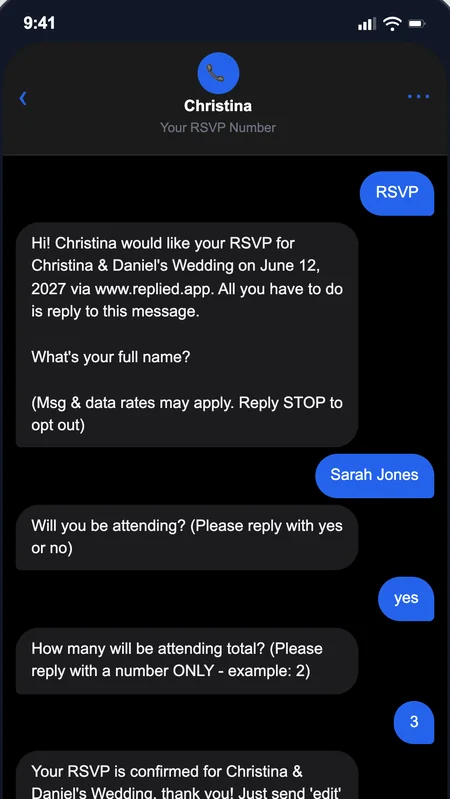
Step 2: Attendees Text RSVP
Your attendees will text your RSVP phone number and the A.I. powered text message platform gathers their replies automatically.
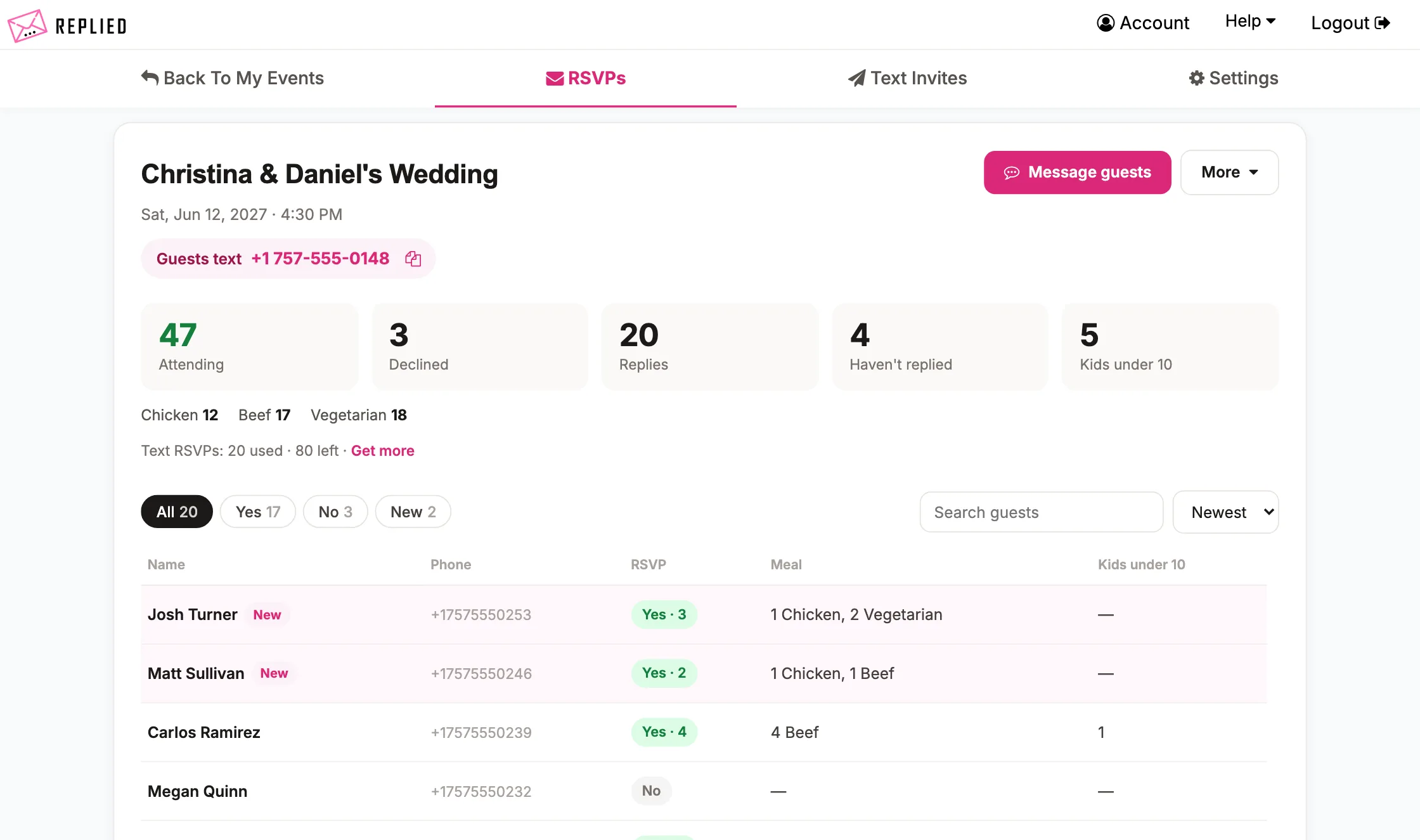
Step 3: View RSVPs Online
Log in to Replied to view, filter, and watch as your RSVP replies flow in and tally up automatically.
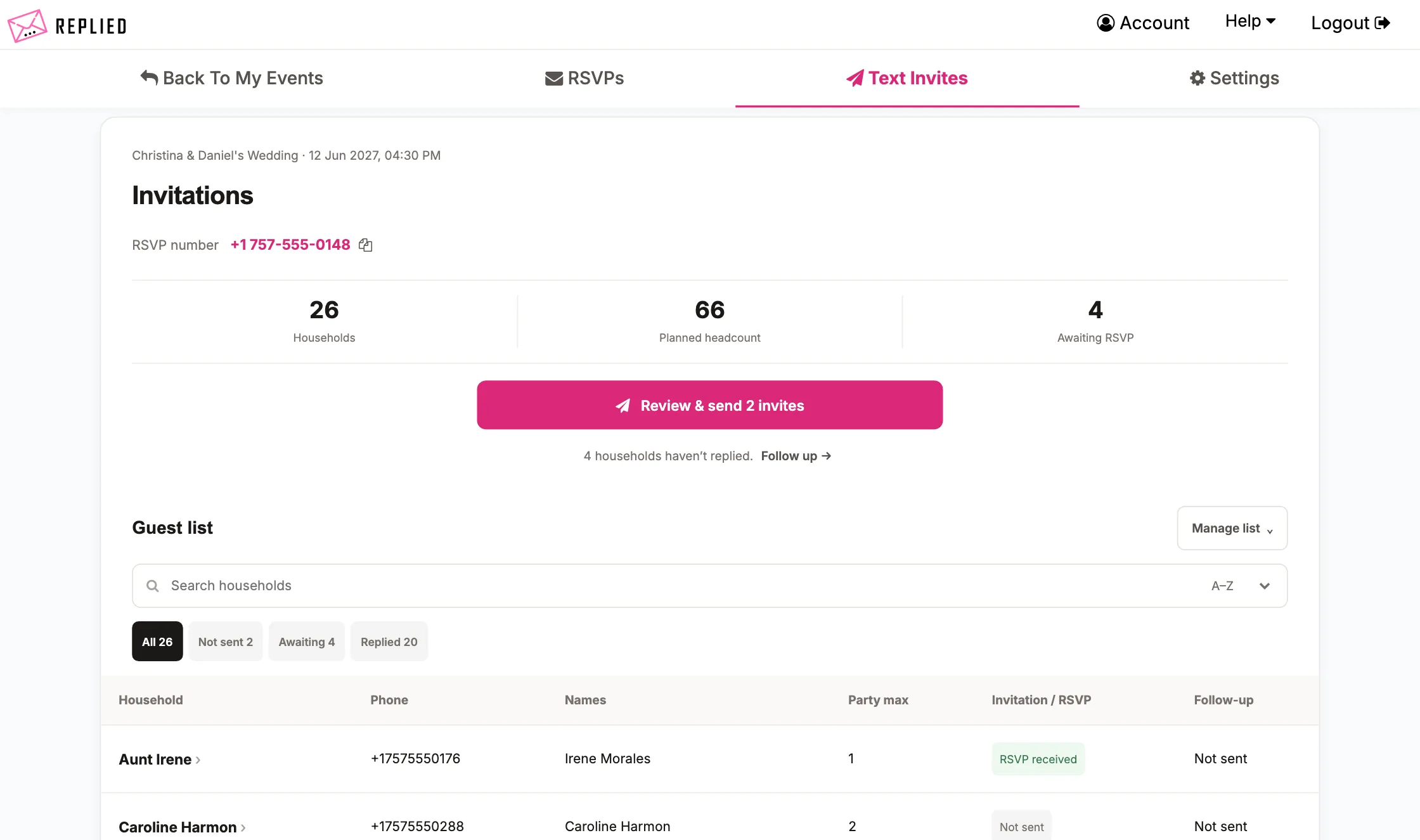
Step 1: Build Your Guest List
Build your guest list using Replied and include 1 cell phone number per household. You can also set a party max limit for each household.
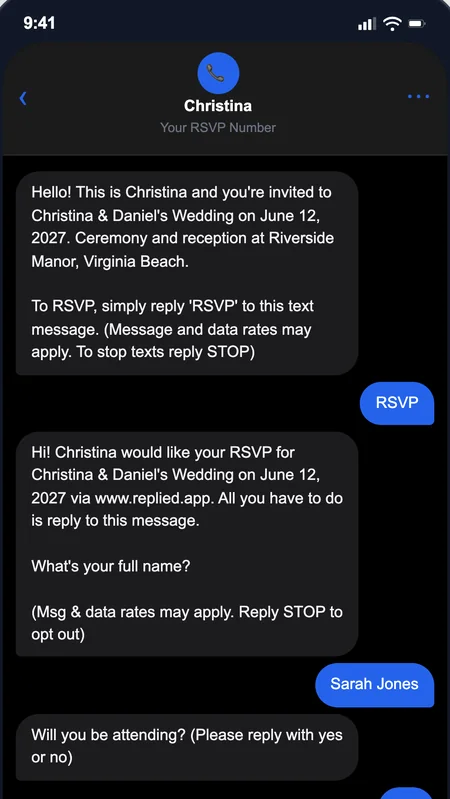
Step 2: Send Text Invitations
Enter your event details in the invitation settings and then send text message invitations at the click of a button.
Step 3: Attendees Text RSVP
Once your attendees receive their text message invitations, they will begin responding and completing their RSVPs via text message.
Step 4: View RSVPs Online
Log in to Replied to view, filter, and watch as your RSVP replies flow in and tally up automatically.
One monthly fee, unlimited events
Predictable budget. Run one event or ten — your cost doesn't change. Perfect for organizations with recurring gatherings, services, and seasonal peaks.
Your guest list carries over
Reuse phone numbers across every event instead of rebuilding from scratch. Your regulars never re-enter themselves, and you never lose a contact between events.
Save at least 20% vs paying per event
Predictable monthly pricing works out cheaper than paying one-time for every gathering — and the more events you host, the more this plan saves you.
Text Message Invitations
Build your guest list including 1 cell phone number per household, then send your text invitations at the click of a button. The invitations will also ask your attendees to RSVP via text.
Text Message Follow Ups
When your guests don't respond to your text message invitation, click a button to send follow up text messages asking for their RSVP ASAP.
Automatic Meal Counting
Enable automatic meal choice counting and customize 3 meal choices to gather via text message. The meals selected by guests will tally automatically so you can view them in your RSVP dashboard.
Message All Guests
Have an important update you need to send to all your attendees? Enter your message and send text messages to everyone that has RSVP'd via text at the click of a button.
Request RSVP Updates
When it's getting very close to your event date, in 1 click, you can send text messages to your guests that will remind them to update their RSVP status if anything has changed. Your guests simply text "edit" to your RSVP number and they can edit their RSVP. You will see the updated head count for your RSVPs online in your RSVP dashboard.
Limit Headcount
When using text message invitations, you can enable 'limit headcount' in your settings which will inform each household how many seats you have reserved for them (just like a paper RSVP).
Disable Incoming RSVPs
When you have reached event capacity, disable incoming RSVPs which will inform any new household's that try to RSVP that your RSVP window is closed.
Wedding Invitation Integration
You may now order wedding invitations to send to your guests straight from the dashboard with your RSVP phone number on them!
Finally, an RSVP tool that works for everyone! This app has simplified our church event sign-ups tremendously. It’s simple, reliable, and easy enough for our entire congregation to use without any tech hurdles. We use it for all of our events now.
Jeff
I’ve been a wedding coordinator for 15 years and I’m so happy I just found Replied! I’ve been offering text message invites and RSVPs to my clients as an offered service and it’s been a hit. More and more couples are starting to lean toward text message RSVPs, and this is easily the best service I have found.
Stephanie
We loved that our guests could RSVP with just a quick text — no apps, no links, nothing to download. Replied made everything so easy and I can’t recommend it enough for weddings! It made our RSVP process completely hands-off. It’s super user-friendly, and the automation meant we never had to worry about a single response getting lost or forgotten. It genuinely saved us hours of work and a lot of unnecessary stress.
Cass
Each text RSVP goes to one household or family — the Smiths (party of 4) count as 1 text RSVP.
Text RSVP size
25 text RSVPs
25 text RSVP monthly pool
Save at least 20% vs. one-time. The more you host, the more you save.
+ $19.99/month membership
How does the monthly pool work?
Pick a monthly text RSVP pool (25 to 1,500) at signup. You can run unlimited events per month, and text RSVPs count against your pool — not per event. When the month resets, your pool resets.
Do we reuse our guest list across events?
Yes. When you're ready for your next event, click "duplicate" on a previous event — Replied copies your guest list into the new event. From there, just update the date, meal options, or any other settings. No re-entering phone numbers, no rebuilding from scratch.
Can we export event data to share with our team?
Yes. Every event's guest list and RSVP responses export as a CSV — share with your finance office, board, or catering team without giving them direct account access.
What if we exceed our monthly pool?
You can upgrade to a larger monthly pool anytime from your account. We recommend starting at a size that matches your typical monthly RSVP volume, then scaling up if you consistently run more.
Can we pause or cancel?
Yes. No contracts, no cancellation fees — cancel anytime from your account page if Recurring stops being the right fit.