
Text RSVPs for every client's wedding, corporate event or gala. Pro saves 30% on every activation at $19.99/month.
As simple as sending a text
Texting makes it easier for your guests to respond to your RSVPs, allowing you to get your responses faster. Send a text message to 585-676-4530 to start your demo RSVP.
You have two options when setting up your event with Replied

Step 1: Share Your RSVP Number
Include your Replied RSVP phone number on your paper invitations, RSVP cards, flyers, emails, or other manual methods. Print it with any invitation site, like Zazzle, Minted or Canva.
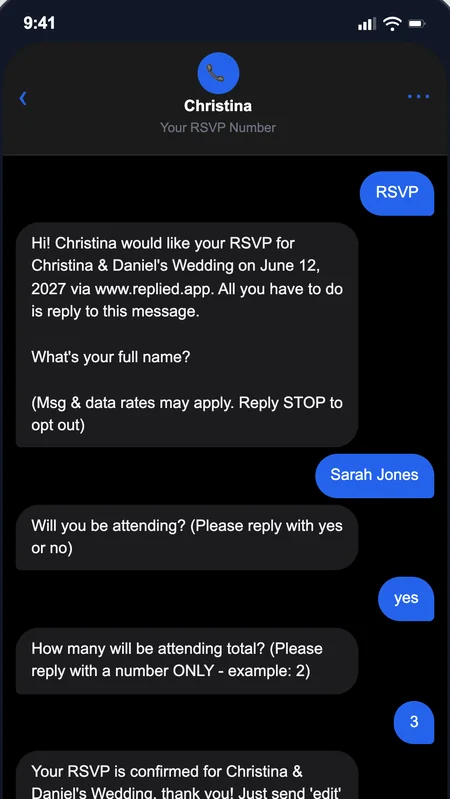
Step 2: Attendees Text RSVP
Your attendees will text your RSVP phone number and the A.I. powered text message platform gathers their replies automatically.
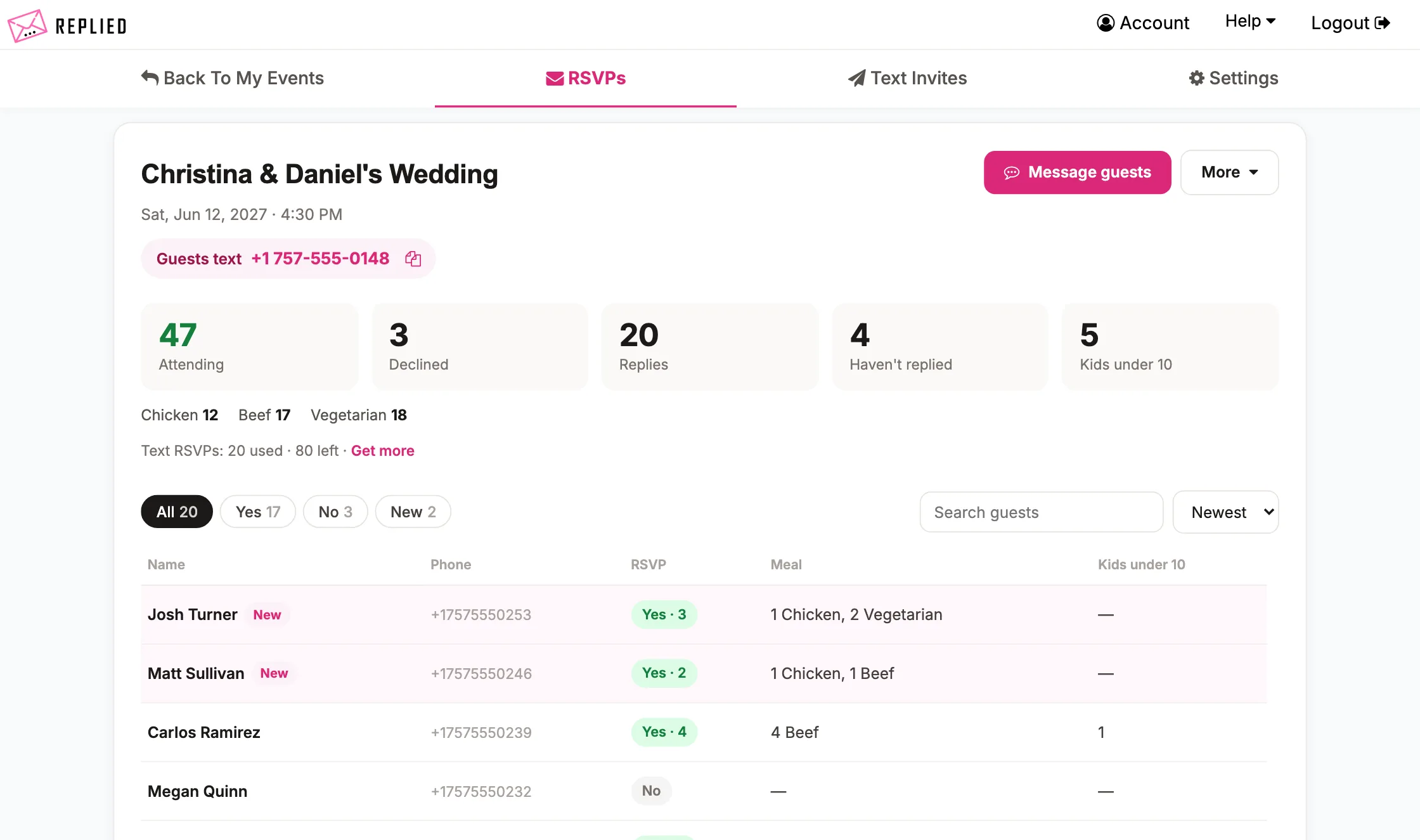
Step 3: View RSVPs Online
Log in to Replied to view, filter, and watch as your RSVP replies flow in and tally up automatically.
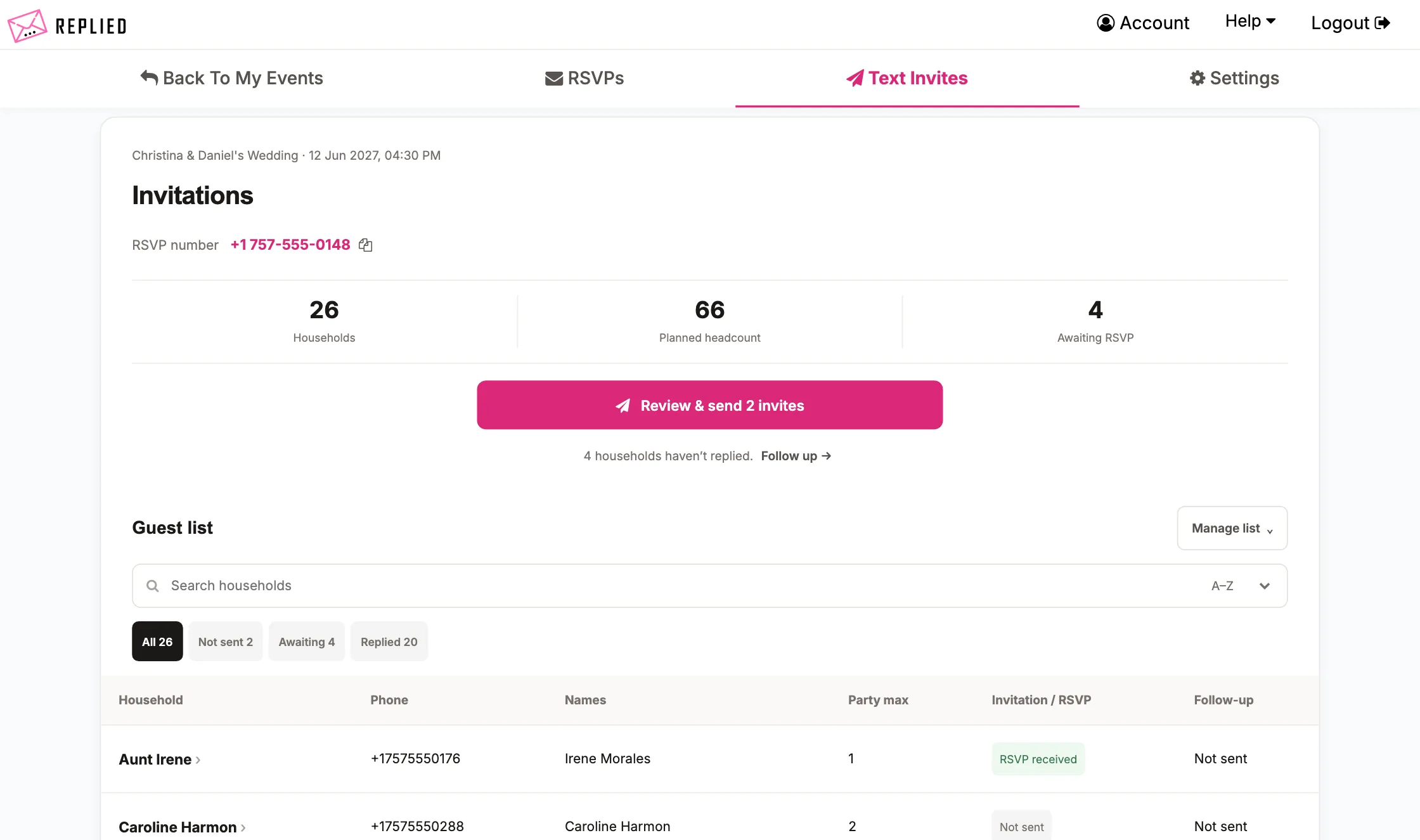
Step 1: Build Your Guest List
Build your guest list using Replied and include 1 cell phone number per household. You can also set a party max limit for each household.
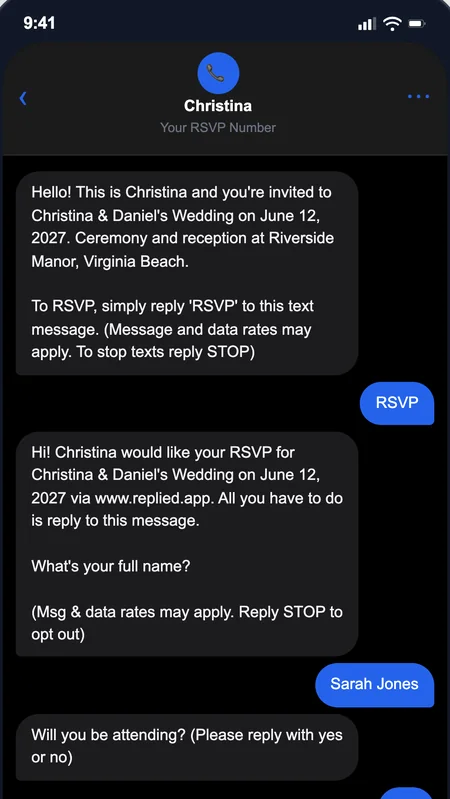
Step 2: Send Text Invitations
Enter your event details in the invitation settings and then send text message invitations at the click of a button.
Step 3: Attendees Text RSVP
Once your attendees receive their text message invitations, they will begin responding and completing their RSVPs via text message.
Step 4: View RSVPs Online
Log in to Replied to view, filter, and watch as your RSVP replies flow in and tally up automatically.
One dashboard, every event
Switch between a 40-guest corporate mixer and a 400-guest wedding without swapping tools or logins. Every client's RSVPs live in one place.
Client-grade polish
Your clients' guests get clean text messages — not clunky web forms. SMS hits 95%+ open rates, so you stop chasing replies the week before the event.
Pro pays for itself
$19.99/month membership + 30% off every activation. Run 2+ events a month and Pro covers itself. Run 10+ and you're saving thousands a year.
Text Message Invitations
Build your guest list including 1 cell phone number per household, then send your text invitations at the click of a button. The invitations will also ask your attendees to RSVP via text.
Text Message Follow Ups
When your guests don't respond to your text message invitation, click a button to send follow up text messages asking for their RSVP ASAP.
Automatic Meal Counting
Enable automatic meal choice counting and customize 3 meal choices to gather via text message. The meals selected by guests will tally automatically so you can view them in your RSVP dashboard.
Message All Guests
Have an important update you need to send to all your attendees? Enter your message and send text messages to everyone that has RSVP'd via text at the click of a button.
Request RSVP Updates
When it's getting very close to your event date, in 1 click, you can send text messages to your guests that will remind them to update their RSVP status if anything has changed. Your guests simply text "edit" to your RSVP number and they can edit their RSVP. You will see the updated head count for your RSVPs online in your RSVP dashboard.
Limit Headcount
When using text message invitations, you can enable 'limit headcount' in your settings which will inform each household how many seats you have reserved for them (just like a paper RSVP).
Disable Incoming RSVPs
When you have reached event capacity, disable incoming RSVPs which will inform any new household's that try to RSVP that your RSVP window is closed.
Wedding Invitation Integration
You may now order wedding invitations to send to your guests straight from the dashboard with your RSVP phone number on them!
I’ve been a wedding coordinator for 15 years and I’m so happy I just found Replied! I’ve been offering text message invites and RSVPs to my clients as an offered service and it’s been a hit. More and more couples are starting to lean toward text message RSVPs, and this is easily the best service I have found.
Stephanie
Finally, an RSVP tool that works for everyone! This app has simplified our church event sign-ups tremendously. It’s simple, reliable, and easy enough for our entire congregation to use without any tech hurdles. We use it for all of our events now.
Jeff
We loved that our guests could RSVP with just a quick text — no apps, no links, nothing to download. Replied made everything so easy and I can’t recommend it enough for weddings! It made our RSVP process completely hands-off. It’s super user-friendly, and the automation meant we never had to worry about a single response getting lost or forgotten. It genuinely saved us hours of work and a lot of unnecessary stress.
Cass
Each text RSVP goes to one household or family — the Smiths (party of 4) count as 1 text RSVP.
Text RSVP size
25 text RSVPs
25 text RSVP monthly pool
+ $19.99/month membership
Run 2+ events/month and Pro pays for itself. Run 10+ and save $1,000+/year.
Can I manage multiple events at once?
Yes. Switch between events from your dashboard and each event keeps its own guest list, RSVPs, and settings — no separate accounts, no shuffling between logins.
How's Pro different from the other plans?
Same product as One-Time — same features, same workflow — but priced for event planners running multiple events a year. $19.99/month membership + 30% off every event activation. At 2+ events/month Pro pays for itself; at 10+/month you save over $1,000/year.
Can I export guest lists and RSVPs for my clients?
Yes. Every event's guest list and RSVP responses export as a CSV. Send it to your client after the event, or use it for their seating chart, caterer, or final headcount report.
Can I duplicate events so I don't rebuild each time?
Yes. Click "duplicate" on any event and Replied copies the guest list, event settings, and meal options into a new event. Great for seasonal events, recurring client work, or events with overlapping guest lists.
Can my client's event branding appear on the invitations?
Yes. Customize the event details, planner name, a personal greeting, and more from invite settings — every text invitation feels tailored to your client without needing a designer.